MCP Server
If your AI tool supports MCP (Model Context Protocol), you can use the official FinMind MCP server finmind-mcp instead — the tool calls it automatically and fetches real data, with no skill file to download. It is best suited to multi-turn, agentic queries and analysis.
Other connection methods
- Web ChatGPT / Claude: use llms.txt — no install.
- CLI tools that prefer a command file: use Agent Skill.
Installation
First register at FinMind to get a token.
Claude Desktop (one-click, no Python or config editing needed): download finmind.mcpb, double-click it, and paste your token in the install dialog. If double-clicking does nothing, open Claude Desktop → Settings → Extensions and drag the file into the window.
Claude Code (one-click): first export FINMIND_TOKEN=your_token_here, then run inside Claude Code:
After install, run /reload-plugins to connect and /mcp to verify. (The plugin reads ${FINMIND_TOKEN} from the environment, so export it before launching Claude Code.)
Other tools (Cursor / Windsurf / Gemini CLI, or Claude Desktop if you prefer manual setup): install uv first, then add this to the tool's MCP config file:
{
  "mcpServers": {
    "finmind": {
      "command": "uvx",
      "args": ["finmind-mcp"],
      "env": { "FINMIND_TOKEN": "your_token_here" }
    }
  }
}
Codex CLI uses a different config format ([mcp_servers] in ~/.codex/config.toml), or a one-liner: codex mcp add finmind --env FINMIND_TOKEN=... -- uvx finmind-mcp.
Windows users
For Claude Desktop, the one-click install above is all you need. For other tools, the commands above use macOS / Linux syntax; on Windows, use PowerShell instead:
- Install uv:
winget install --id astral-sh.uv -e(close and reopen PowerShell afterwards so PATH takes effect), then verify withuvx finmind-mcp --help. - Set the token:
$env:FINMIND_TOKEN = "your_token_here"(current window only) orsetx FINMIND_TOKEN "your_token_here"(persistent; restart apps to pick it up) — or simply put it in the config file'senvblock above, which is the most reliable option. - If your tool (e.g. Claude Desktop) reports the command not found or fails to connect: GUI apps see a different PATH than your terminal. First fully quit and reopen the tool — that usually fixes it. If not, run
where.exe uvxto find the full path (for a winget install, typicallyC:\Users\<name>\AppData\Local\Microsoft\WinGet\Links\uvx.exe; use the first line it prints) and use it ascommandin the config. In JSON, write every backslash as\\(or use forward slashes/) — pasting single backslashes makes the config file invalid JSON.
For the full walkthrough (pipx route, per-host Windows config paths, troubleshooting), see the Windows installation guide.
For per-host config file locations, the claude mcp add / gemini mcp add / codex mcp add one-liners, and verification steps, see the FinMind-MCP install guides.
Available tools
Since version 0.1.0, the MCP server can access all public FinMind data and endpoints, including whole-day, market-wide downloads (storage_objects); version 0.1.1 adds financial report and annual report PDFs (download_financial_report). It provides 8 tools, which your AI tool picks automatically based on your question:
| Tool | Purpose |
|---|---|
query_dataset |
General query by dataset, ID and date range (every dataset on /api/v4/data) |
list_datasets |
List all datasets with the required membership tier and descriptions (no token needed) |
get_stock_info |
Taiwan stock IDs, names and industries |
query_trading_daily_report |
Single-day branch trading, by stock or by securities trader branch |
query_endpoint |
Other dedicated endpoints: daily branch aggregate statistics (SecIdAgg), warrant branch reports, real-time stock / futures / options snapshots, datalist, translation |
download_storage_object |
Download whole-day, market-wide data (ticks, minute K, branch reports, etc.) to your machine; returns the file path, row count, columns and first rows, with optional filtering by ID / branch |
download_financial_report |
Download a listed company's financial report or annual report PDF and read its table of contents, specific pages, or pages containing a keyword (e.g. revenue breakdowns or inventory composition in the notes) |
get_pricing |
Membership plan prices and licensing (no token needed) |
Access depends on your membership tier. When a query exceeds your plan, the tool tells you which plan is required (Backer / Sponsor / Sponsor Pro) and links to the upgrade page.
Whole-day downloads (download_storage_object)
- Whole-day downloads are available only to sponsorpro members.
- Whole-day files are often tens of MB, so the tool returns only a summary (up to 500 rows); the full file is saved locally and can be read with
pandas.read_parquet(path). - Files are saved under
finmind-mcp/storage_objects/in your user cache directory by default; set theFINMIND_DOWNLOAD_DIRenvironment variable to change the location. Repeated queries for the same dataset and day reuse the local file. - The summary requires
pyarrow. The Claude Desktop one-click install already includes it; other tools do not install it by default (the file is still downloaded and its path returned). To get summaries, changeargsin your config to["--from", "finmind-mcp[parquet]", "finmind-mcp"].
Financial report PDFs (download_financial_report)
- Requires version 0.1.1 or later (
uvxpicks it up automatically; Claude Desktop users should download finmind.mcpb again). - Available only to sponsorpro members.
- No need to download files yourself or install a PDF reader: the tool first returns the cover and table of contents, then the AI reads the notes by page number or finds pages by keyword.
- Each call returns up to about 30,000 characters; files are cached locally, so the same report is not downloaded again.
- In some PDFs the main statement pages are images, and some annual reports have a corrupted text layer; the tool flags these pages instead of returning garbled text. For income statement, balance sheet and cash flow figures, query the three financial statement datasets instead.
Examples
MCP is called automatically by the tool, so just ask in natural language — no
/finmindprefix needed. It is best for follow-up questions and cross-dataset agentic analysis.
Ask Directly
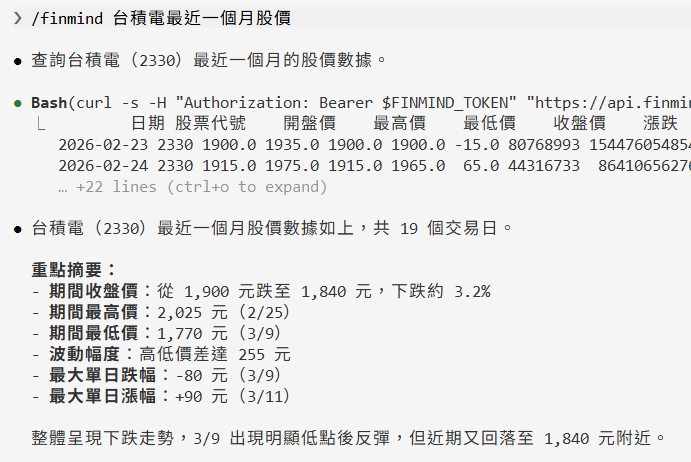
Expected result: the tool automatically calls
query_dataset(TaiwanStockPrice), returns TSMC (2330) daily prices for the past month, and summarizes the trend.
Multi-Turn Follow-Up
What were 2330's institutional net buy/sell over the past week? Are foreign investors net buyers or sellers?
Then compare it with 2317 over the same period.
Expected result: it first returns TSMC institutional net buy/sell and reads the foreign-investor direction, then continues in the same conversation to query Hon Hai and compare — no need to re-enter the conditions.
Cross-Dataset Analysis
Analyze TSMC's stock return over the past year, compare it against monthly revenue growth over the same period, and give me a conclusion.
Expected result: the tool fetches price and monthly-revenue data separately, computes the return and YoY revenue growth, and synthesizes a written conclusion.
Conditional Screening
Expected result: the tool queries today's institutional trading data, sorts it, and returns the top 5 stocks by net-buy value.
Branch Aggregate Statistics (Sponsor)
Expected result: the tool calls
query_endpoint(TaiwanStockTradingDailyReportSecIdAgg) and returns 合庫's daily buy/sell shares and average prices for TSMC over that period.
Whole-Day Market-Wide Download (Sponsor Pro)
Expected result: the tool calls
download_storage_objectto save the whole-day file locally, returns the file path, and filters out TSMC's minute K bars.
Read Financial Report Notes (Sponsor Pro)
TSMC's inventory jumped in Q2 2026. Is it unsold finished goods? Check the notes in the financial report.
Expected result: the tool first calls
query_dataseton the balance sheet to confirm the inventory change, then callsdownload_financial_reportto find the inventory note in the financial report and answers based on the split between finished goods, work in process and raw materials.
Data field caveats
The following are common field-definition differences to keep in mind when an AI agent interprets query results (Taiwan stock prices, futures / options ticks). They are not data errors:
Emerging stocks: open is the previous-day average price, and may fall outside the day's high/low (not a data error)
Emerging-board stocks trade by negotiation and have no opening price. For emerging stocks this table therefore fills open with the previous-day average price, not an opening price; max / min / close are still the day's high / low / last traded price and are correct.
As a result, an emerging stock's open can sit above max or below min on volatile days. This is a field-definition difference, not corrupt data. For candlestick charts, use max / min / close, or treat open as the previous-day average.
Example: 6515 穎崴 on 2020-03-19 (emerging at the time) → open=218.06, max=200, min=170, close=174.9; 218.06 is exactly the previous-day average that day. The stock later moved to TWSE, after which its data is normal.
Futures ticks (TaiwanFuturesTick): how volume is counted
Tick volume is counted on a double-sided basis: each matched trade records both the buy side and the sell side once. As a result, the summed tick volume is about 2× the (single-side) volume in the daily data TaiwanFuturesDaily; for spread / combination orders, which contain two legs, the tick volume is about 4× the daily volume. Convert accordingly when reconciling tick volume against daily volume.
Per-contract-month reconciliation: for a given contract month (e.g. 202606) within the same trading session,
sum of volume of outright rows (contract_date = 202606) + sum of volume of spread rows containing that month (e.g. 202606/202607) ÷ 2 = 2 × TaiwanFuturesDaily volume of that month − 2 × negotiated block-trade lots of that month
- The volume of a spread row is exactly 4× the volume of the corresponding spread contract (contract_date with two months) in TaiwanFuturesDaily. Each spread lot counts toward the daily volume of both legs, so divide spread volume by 2 when attributing it to a single month; do not add it in full.
- Negotiated block trades are not included in tick data, but are included in daily volume. They occur mostly as rollovers ahead of settlement (equal lots in the near and next months) and are the main reason tick volume falls noticeably short of 2× daily volume around settlement week; this is not missing tick data. Details are published on the TAIFEX website under "Market Data > Daily Market Report > Block Trade > Negotiation": trades in the regular trading session count toward the regular session (position), and after-hours trades count toward that trading day's after-hours session (after_market).
Futures ticks: trading-day attribution of after-hours ticks
The after-hours (night) session follows the TAIFEX rule of being attributed to the next business day. The after-hours session for trading day D is the segment running from 15:00 on the previous business day until 05:00 on day D. Therefore, within a tick file:
- 00:00–05:00 ticks belong to the after-hours (after_market) session of trading day D in TaiwanFuturesDaily.
- 08:45–13:45 ticks belong to the regular session (position) of trading day D.
- 15:00–24:00 ticks belong to the after-hours session of the next trading day.
Options ticks (TaiwanOptionTick): how volume is counted
As with futures ticks, options tick volume is counted on a double-sided basis: each matched trade records both the buy side and the sell side once, typically appearing as two identical rows; these are not duplicates. The summed tick volume is about 2× the (single-side) volume in the daily data TaiwanOptionDaily.
Per-series reconciliation: for a given series (same contract_date, strike and call/put) within the same trading session,
sum of tick volume of that series = 2 × TaiwanOptionDaily volume of that series − 2 × negotiated block-trade lots of that series
- Negotiated block trades are not included in tick data, but are included in daily volume; this is not missing tick data.
- Tick data has no buy/sell-initiated (aggressor side) field.
- Trading-day attribution of after-hours ticks is the same as for futures: 00:00–05:00 belongs to trading day D's after-hours session (after_market), 15:00–24:00 to the next trading day's after-hours session.